Salesforce Orgs
Settings → Salesforce Orgs lists every Salesforce organization connected to your account, with its type and which modules are active on it.
Connecting an org
Click Connect org and choose how bluefactory should authenticate:
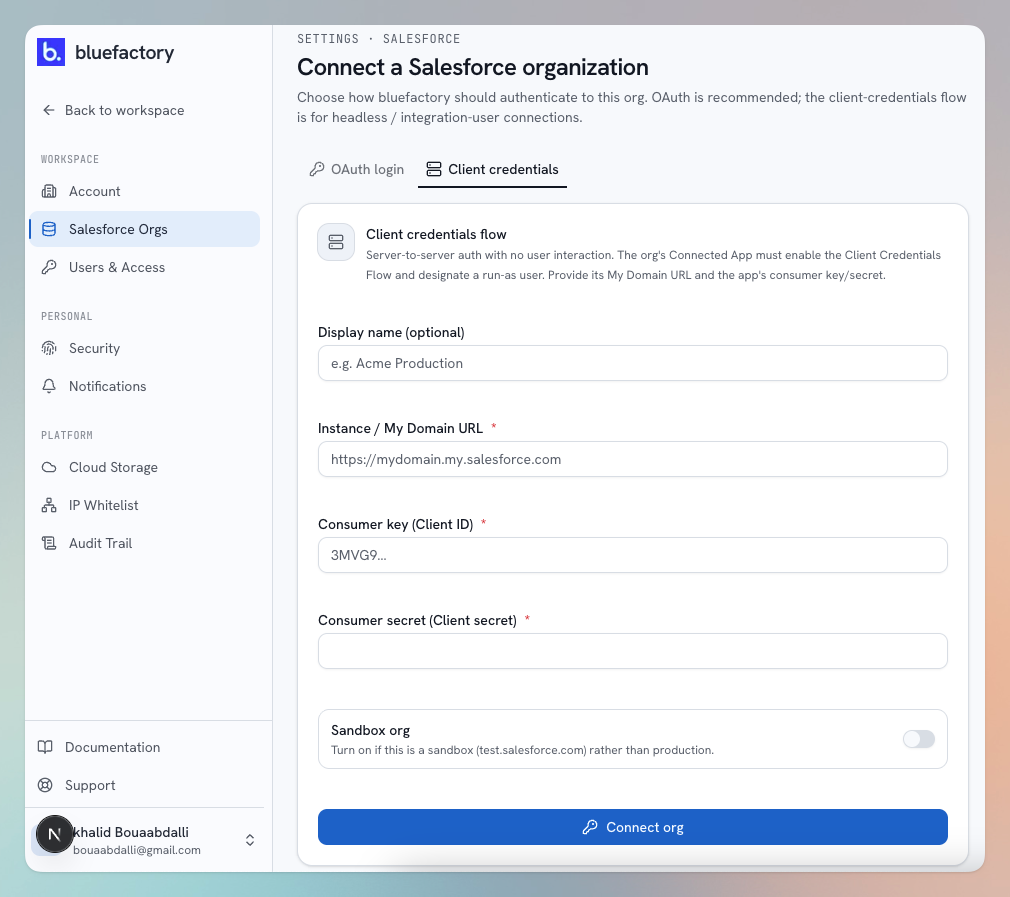
Client credentials (recommended)
Headless, server-to-server authentication through a Salesforce External Client App with the Client Credentials Flow enabled. The connection belongs to an app and a designated run-as user rather than to a person, so it isn't broken by staff changes, password resets or MFA. You provide:
- Display name (optional) — a friendly label.
- Instance / My Domain URL — e.g.
https://mydomain.my.salesforce.com. - Consumer key and Consumer secret — from the External Client App.
- Sandbox org — turn on if this is a sandbox rather than production.
Setting up the Salesforce side takes about five minutes: see Create an External Client App for client credentials.
OAuth login
Click Continue to Salesforce, log in to the org you want to connect, and authorize access. bluefactory keeps a secure token — no passwords or secrets are stored. You can connect a different org than the one you signed in with; Salesforce shows its login screen so you can pick.
Managing an org
Open an org from the list to see its details — name, type, username, instance URL, authentication method, status — and its active modules. From there you can:
- Open in Salesforce — jump to the org.
- Edit — rename the org and toggle which modules run against it (Backup, Change Tracker).
- Disable / Enable — pause all activity on the org without removing it.
- Delete org — remove the connection entirely.
Refreshing an org's authorization
If an org's connection stops working (for example the connected user was deactivated or its token was revoked), simply run Connect org again for the same org — the connection is refreshed in place, and the event is recorded in the Audit Trail as Org reconnected.
Production vs. sandbox
Connect both your production org and its sandboxes: sandbox connections are what enable sandbox seeding and cross-org metadata comparison. The org's Type column always tells you which is which.